Draplin vs.America

Creating a wood grain pattern Image

For this tutorial,
I created a new document.
Created a new layer and using the Rectangle Tool covered the entire document with black.
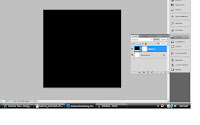
Making sure that my foreground colour was set to black and my background colour was set to white
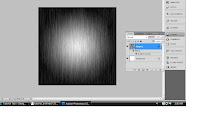
I selected and clicked on “Filter”, “Render” and then selected “Fibers”.
entered the settings
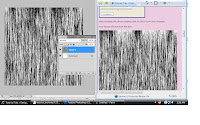
with blending window open, chose “Gradient Overlay” from the left hand side menu and
entered these settings:
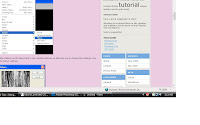
made a new layer above my current layer
Changed my foreground colour to brown and using the Rectangle Tool; filled the entire layer with the brown colour.
Then set the layer style to “Color”
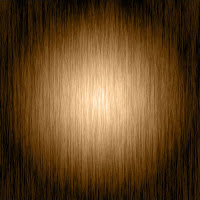
And voala! The final product.
This tutorial helped by teaching me how to create my own texture
http://www.tutorialtab.net/?p=52
Creating a Surreal Floating Eiffel Tower Scene In Photoshop
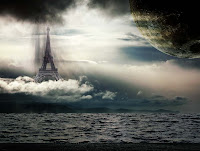
For this tutorial, Design a Surreal Floating Eiffel Tower Scene In Photoshop, I had to first download images. Then with new document open, place first layer, and this is the image I started with.


1. I added a layer mask .


2. I added layer effects.


3. I copied/pasted selected image of tower onto the new layer.


4. again, copied/pasted selected image of moon onto new layer.
and finally, the completed image.

This tutorial was helpful in learning layers and combining images using several layers.

http://www.psdvault.com/photo-effect/design-a-surreal-floating-eiffel-tower-scene-in-photoshop/

building proposals, part duo!


this concept is pretty cool. Vector vines smothering 3D Dots.


i really enjoyed 'playing' w/ the psu logo. One sample image of the fun is apparent directly below here. unfortunatley, even though i love the end pattern design, it looks pretty gross when applied to the psu building.


And finally, the striped building. I was sure that i needed to try a design that 'popped'. with the stripes varying weights and trying to apply bright colors for this one, I think it looks... noticable now.

WHTF?

I cant remember the site that I found this on, but I think you'll love the honesty. Aaron, with his down-to-earth character, is one hell of an inspiration!

Art Biulding Assignment

Here is my Art Building designs. Right now, they are not complete. I have been struggling to get a good grasp on the techniques of using Photoshop. But here they are anyways...


This was my PSU logo pattern idea adheared to one of the building images. I like it a lot. Although it totally looks like crap after butchering it in photoshop.


And the pattern

For everyone that didnt get a chance to see my Postcard design. Here it is....

As far as my process goes and how I feel overall about the assignment-look at earlier blog posts- is that the process is an awesome tool. But, unfortunately that doesnt really show. I am extremely disappointed with my end design. But that is why I am in the GD program, to learn and practice and I know my designs will improve.

Week of tut's

Okay, I need to let out a little steam...
...I am having an extremely hard time keeping up with everything!!! Almost sure that I'm the only one struggling too :-( or so it seems from reading everyone's blog's. Seems like if its not one thing...its another. Now my sons school is shut down for at least a week because of a case of the Swine Flu! Which scares me, because my family and I, have all been sick for weeks.
God I hope there is some relief in sight.
K, now I feel a little better. Now on with the blog...
For this weeks tut's I chose to work on refining my pen tool skills. So they will all be related to using the pen tool.
1st one gave me a great run down of what the pen tool can do.


2nd one had all the definitions layed out for me. Never really knew what some of those symbols meant. Now I know, - (delete), +(add), ^(converts)which ultimately switchs anchor between a smooth and a corner point.


3rd one made the pen tool look like a blast to use.
Right along with the 4th one, which made the pen tool totally fun, instead of frustrating, to use.
And the 5th Showing the how to's of handles and more in depth variations on what could be done with the pen tool.